
-
Connections
Comms Port Configuration
**A PC / Laptop runs and controls the data and storage of files
Testers with Comms Port Option Non Memory Versions.
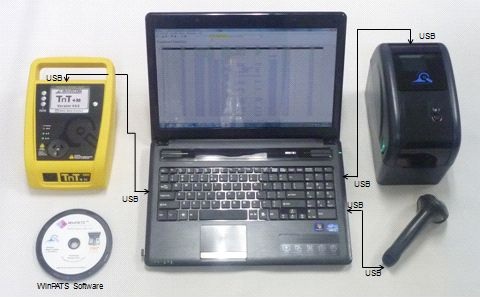
A **Only with appropriate WinPats ® Software
Testers fitted with Optional Comms Ports have the Capability to have other add-ons like the Wavecom Tag Printer and Scanner to allow you to print and scan your own labels on site. However WinPats Software needs to be loaded onto a laptop / PC to have the ability to Datalog your test results and to control any automated testing.
Memory Unit with Comms Port
B
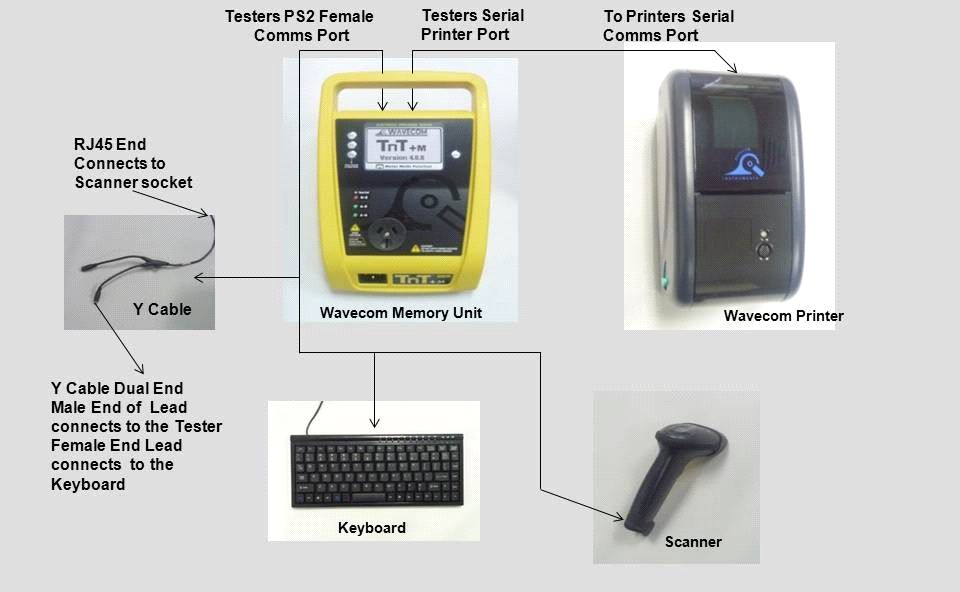
For Testers fitted with TnT (TnT +, M and +XM) Memory option a PS2 ‘Y’ Splitter Interface Cable is required. This couples the Tester to both the Keyboard and the Scanner. The tester links directly into the printer via a special TnT Serial Comms cable, and sends the print command to the printer. This enables the printer to print the designated label.
Optional
WinPats is required as you still need to upload or download files from the Tester to a PC. The Tester is fitted with a memory module so it will retain the test results in its memory. The benefit of this is that a Laptop / PC is not required in the field. With WinPats and a PC, you have the benefit of full Test and Asset management plus Record Keeping.
Connections